Hunting NTDS.dit Theft via VSS & NTFS Logs
Introduction
If you find yourself looking at the artifacts I’m about to discuss, let’s be honest: you’re likely having a very bad day. If an attacker is on your Domain Controller (DC) and sniffing around the NTDS.DIT, we’re past the point of “suspicion.” We’re talking about a potential total domain compromise.
When we investigate the theft of the Active Directory database, we often lean heavily on EDR signals. But EDRs don’t always give us the full forensic picture. Sometimes, Windows is actually better at telling its own story through low-level logs that often fly under the radar.
Today, we’re talking about Volume Shadow Copy (VSS). It’s a brilliant piece of Windows engineering designed for backups, but for an attacker, it’s the perfect skeleton key to bypass file locks and snatch the crown jewels.
What is VSS and Why Should You Care?
Before we dive into the “how-to” of the theft, we need to understand the mechanism. Volume Shadow Copy Service (VSS) is a framework that allows Windows to take “snapshots” of a volume even while files are actively being written to.
Think of it as a “point-in-time” freeze-frame of your hard drive.
In a forensic context, VSS is usually our best friend. It preserves historical versions of files that an attacker might have deleted or modified. But when the attacker is the one calling the shots, VSS becomes a double-edged sword. Since the NTDS.DIT is constantly locked by the Active Directory Domain Services (NTDS) process, you can’t just “copy-paste” it while the DC is live. VSS provides the attacker with a shadow volume where that lock doesn’t exist, allowing them to walk away with a perfect copy of every credential in your domain.
This post isn’t about how to perform a forensic deep-dive within a VSS snapshot; rather, it’s about the “digital dust” left behind when an attacker uses VSS to facilitate credential theft.
Stealing the Crown Jewels
There are two main ways attackers go after the NTDS.DIT using shadow copies.
1. The “Loud” Way: ntdsutil (IFM)
ntdsutil is the official Swiss Army knife for AD maintenance. Attackers love the Install From Media (IFM) feature because it’s a “one-stop shop.”
1
ntdsutil "ac i ntds" "ifm" "create full C:\Temp" q q
What it does: It creates a temporary VSS snapshot, mounts it, copies the database and the SYSTEM hive to the specified folder, and then automatically deletes the snapshot.
The Catch: This is incredibly noisy. Almost every EDR or SIEM worth its salt has a signature for
ifmorntdsutilexecution. It’s effectively the loudest way to rob the bank. Most mature environments will have custom detections for any command line containingifm,ntds, orntdsutil.
2. The “Quiet” Way: Manual VSS
This is the modular approach. It uses standard admin tools like vssadmin that might blend in with legitimate backup software.
Stealth Advantage:
vssadminis used by many legacy backup solutions. If a server has a backup agent that runs frequently, a single extravssadmin create shadowcommand might just blend into the noise of routine activity.
The “Human” Footprint: Unlike the automated ntdsutil approach, this method requires the attacker to manually handle the SYSTEM hive and the database file. Crucially, if they forget to delete the shadow copy, it remains as a permanent artifact. This is exactly what we saw in the logs.
Step 1 – Create the shadow copy:
1
2
3
4
5
6
7
PS C:\Windows\system32> vssadmin create shadow /for=C:
vssadmin 1.1 - Volume Shadow Copy Service administrative command-line tool
(C) Copyright 2001-2013 Microsoft Corp.

Successfully created shadow copy for 'C:\'
    Shadow Copy ID: {ad5a975f-c427-420b-842f-bb9be065f144}
    Shadow Copy Volume Name: \\?\GLOBALROOT\Device\HarddiskVolumeShadowCopy1
Note on GUIDs: A shadow copy ID is a unique, persistent GUID (e.g.,
{ad5a975f-c427-420b-842f-bb9be065f144}) assigned by the VSS service to identify a specific snapshot. It is important to note that this specific GUID is not typically recorded within the Event Logs when you’re trying to track its access. We shall see how to find it in a little bit, but for now, remember theHarddiskVolumeShadowCopy1string. It’s just as important as the GUID for our purposes.
Step 2 – Grab the NTDS database:
1
PS C:\Windows\system32> copy \\?\GLOBALROOT\Device\HarddiskVolumeShadowCopy1\Windows\NTDS\ntds.dit C:\Exfil\ntds.dit
Step 3 – Grab the SYSTEM hive (the key to the lock):
1
2
PS C:\Windows\system32> reg save HKLM\SYSTEM C:\Exfil\system.hiv
The operation completed successfully.
And just like that, the attacker has everything they need to crack your domain offline.
The Investigation: Digging into the NTFS “Gold Mine”
Whenever there’s a suspicion of credential theft (among other similar thingies), Windows Event Logs are a goldmine. While the standard VSS logs might stay silent on Server 2022 (also verified in 2026) during the initial creation, the Microsoft-Windows-Ntfs/Operational log starts screaming as soon as that volume is actually accessed for extraction.
I noticed there were no EvtxCmd (Kape) Maps for these specific events, so I’ll be submitting a pull request to get them added.
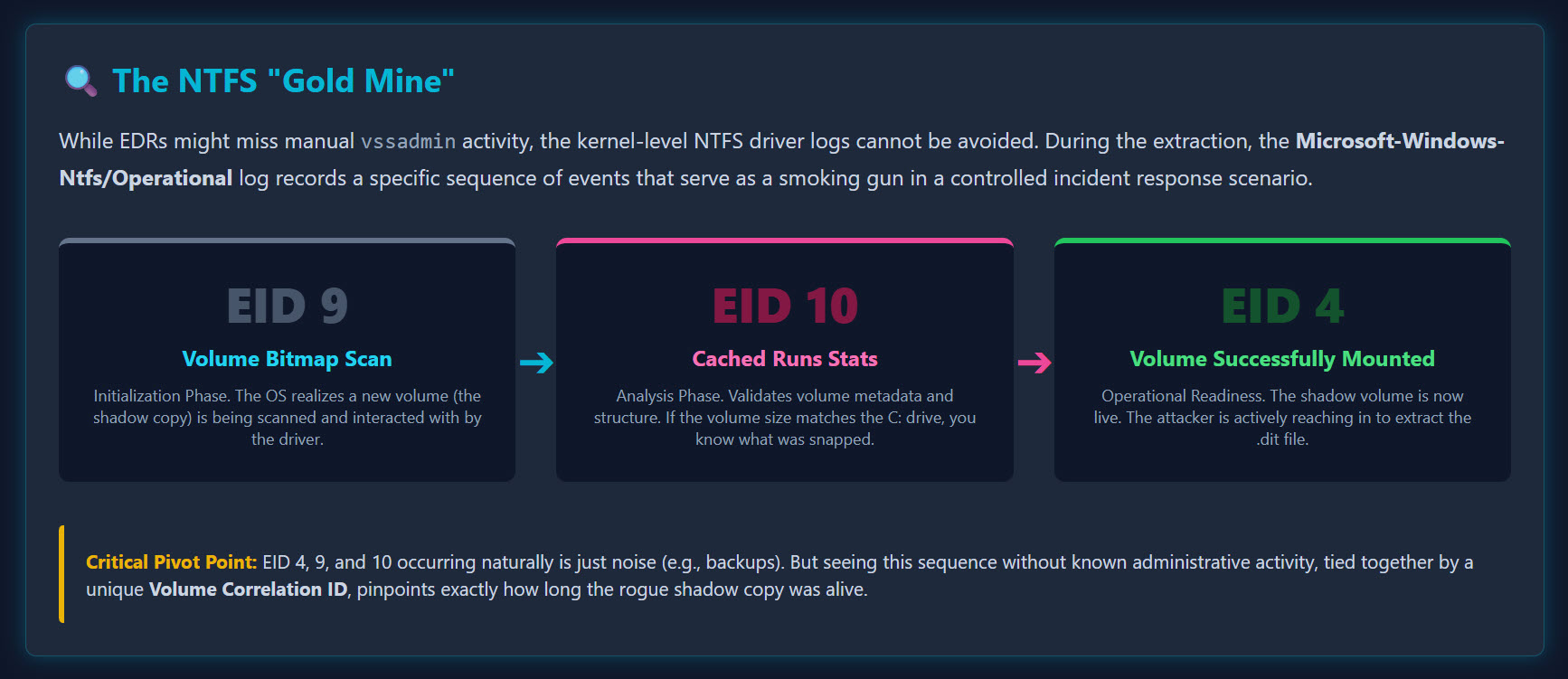
We’re focusing on three specific Event IDs (EIDs) in this order:
| EID | Name | Phase |
|---|---|---|
| 9 | NTFS Volume Bitmap Scan | The initialization phase where the driver begins interacting with the volume |
| 10 | NTFS Volume Cached Runs Statistics | The analysis phase where the volume structure is processed |
| 4 | NTFS Volume Successfully Mounted | The “operational readiness” phase. The volume is live and the .dit is ready for the taking |
In a production environment with thousands of events, this is a needle in a haystack. But in a controlled incident response scenario? It’s a smoking gun. My custom MAP descriptions make it a tad bit easier to see what actually transpired.
The Forensic Timeline
Even if an attacker uses a custom script and avoids ntdsutil or vssadmin (avoiding EID 4688), they cannot avoid the kernel-level NTFS driver logs.
- The Signal: Your EDR flags a suspicious process, or you notice a file called
exfil.backupappearing on your DC. You have a timestamp. - The Hunt: You don’t see
ntdsutilexecuted in EID 4688. Strange. - The Discovery: You check
Ntfs/Operational. Seeing a Shadow Copy being accessed via EID 4, 9, and 10 is not a definitive proof of theft on its own. Backup software, system updates, and routine maintenance also trigger these events. However, seeing this specific sequence coupled with a lack of known administrative activity is a massive red flag. It’s the “suspicious noise” that demands a deeper look. - The Correlation: You see a
registry.hivfile. Why? Because the NTDS.DIT is useless without the SYSTEM hive (which contains the Boot Key needed to decrypt the database).
Here is what it looks like when processed with EvtxCmd using my custom maps:
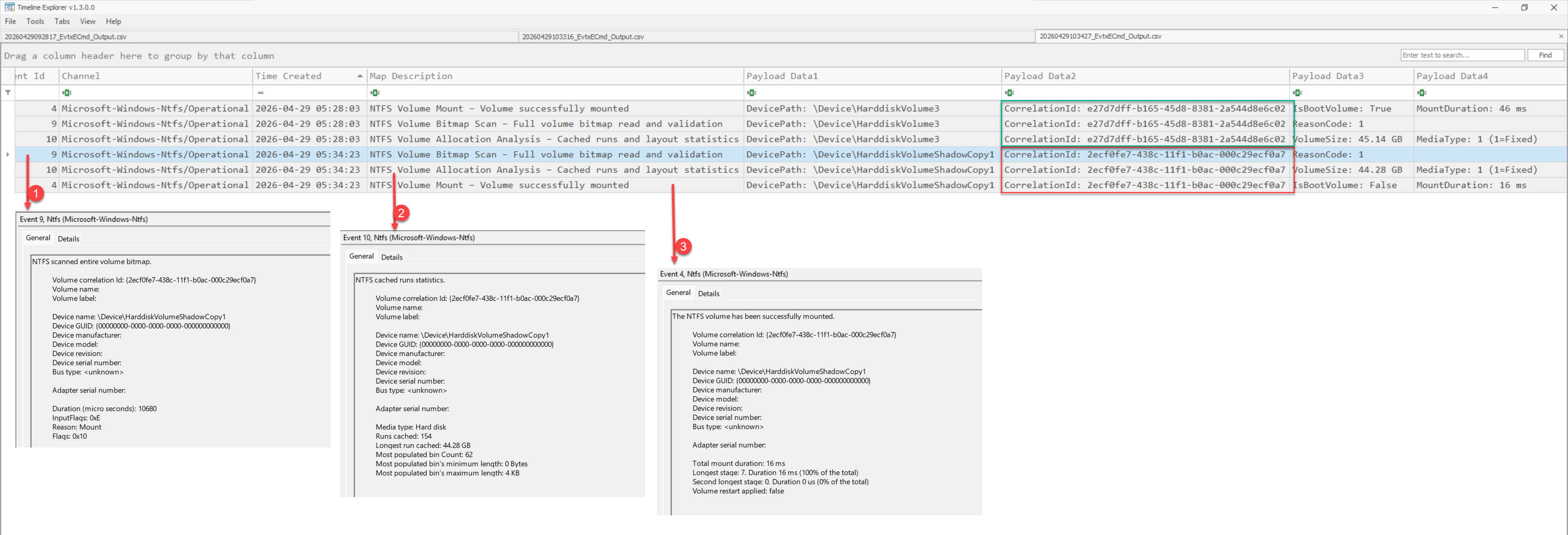 EvtxCmd output showing EID 4, 9, and 10 sequence
EID 9: NTFS Volume Bitmap Scan:The initialization phase where the driver begins interacting with the volume.
EID 10: NTFS Volume Cached Runs Statistics:The analysis phase where the volume structure is processed.
EID 4: NTFS Volume Successfully Mounted:The “operational readiness” phase. The volume is live and the
.ditis ready for the taking.
The Volume Correlation ID is your best friend here. It’s unique to that specific interaction, allowing you to pinpoint exactly how the stealing took place and how long that shadow copy was “alive.”
Corroborating with Application Logs (ESENT)
While NTFS logs show when the shadow copy was accessed, the Application logs (ESENT provider) help confirm what happened to NTDS.DIT during that window.
- EID 216: NTDS Database Location Change Detected
- Indicates that the NTDS database was accessed from a shadow copy path.
- This is a strong signal that the database is being read from
HarddiskVolumeShadowCopy.
- EID 326: Database Attached from Snapshot Path
- Shows the NTDS database engine attaching to a snapshot-based database path (
$SNAP_*). - This suggests the database is being actively processed or staged.
- Shows the NTDS database engine attaching to a snapshot-based database path (
- EID 325: Temporary NTDS Database Created
- A new database file is created in a temporary directory (e.g.,
C:\Windows\Temp\dump_tmp). - This often indicates staging or preparation for exfiltration.
- A new database file is created in a temporary directory (e.g.,
- EID 327: Database Detached (Temporary Copy)
- The temporary NTDS database is detached after processing.
- This reflects completion of the intermediate step.
- EID 327: Database Detached (Snapshot Copy)
- The snapshot-based NTDS database is detached.
- This typically marks the end of the extraction workflow.
 EvtxCmd output showing EID 216, 326, 325 and 327 sequence
Why This Matters
Individually, these events may not appear suspicious. However, when correlated:
- Shadow copy access (NTFS logs)
- NTDS accessed from
GLOBALROOTpath - Temporary database creation
- Attach → process → detach sequence
They collectively form a high-confidence timeline of NTDS.DIT extraction activity.
Corroborating the Story
In forensics, there are usually no single points of truth. We look for “temporal proximity” by corroborating the same story across multiple artifacts.
If I see those NTFS events at 05:34:00 AM, and I look at an MFT export and see a new file created at 05:35:45 AM, I’ve likely found my exfiltration point.
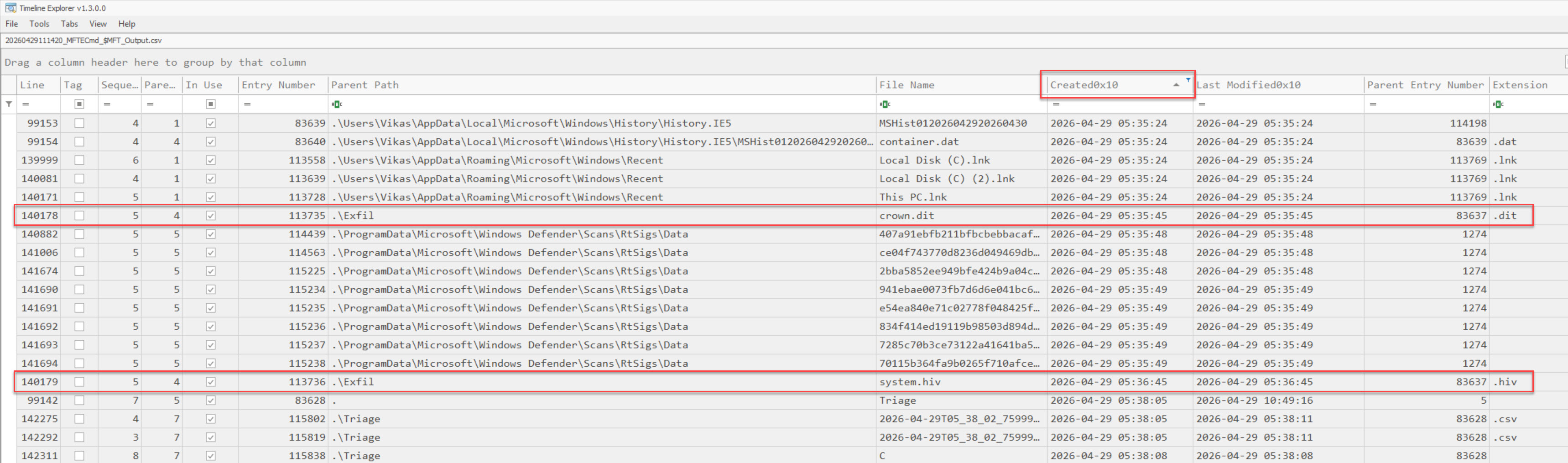 MFT export showing file creation timestamp aligned with VSS mount events
An attacker might rename the NTDS.DIT to totally_normal_stuff.log, but they usually forget that the Created Timestamp on that new file will align perfectly with our NTFS mount events. Looking around the time of these VSS/NTFS events, we usually get lucky.
Conclusion
Thanks for reading! Investigation techniques evolve with time, and there are always multiple ways to find the answer. An analyst must work within their comfort zone because time is of the essence during an incident response. Whatever gets you to the truth faster, irrespective of the artifact or the tooling, is the right way to go. Stay curious, and always look for the logs that the attackers forgot to clear.